
Django Ninja vs DRF Benchmark: Critical Analysis and New Results
Hello devs 👋,
Recently, I looked into Django Ninja, this new challenger that promises to bring FastAPI speeds to the Django ecosystem.
On paper, the benchmarks are impressive. But looking closer, I felt the comparison was a bit… biased. 🤔
Indeed, official benchmarks often compare DRF-uwsgi (synchronous mode) with Django-Ninja-uvicorn (asynchronous mode). It’s a bit like comparing a race car on a highway with a 4x4 on a dirt road. Both are performant, but they don’t race in the same category.
So I decided to run my own performance tests locally to set the record straight. ⏱️
🧪 Test Methodology
To have a fair comparison, I ran several test scenarios isolating variables.
The idea is to compare:
- Sync vs Sync: DRF under uWSGI vs Ninja under uWSGI.
- Input Validation: DRF Serializers vs Pydantic (used by Ninja).
- Async: See how everyone behaves with asynchronous calls.
I used the following repo as a base (modified for testing needs): https://github.com/vitalik/django-ninja-benchmarks/tree/master
Configurations Tested:
- DRF-uwsgi (Sync): The classic and robust stack.
- Ninja-uwsgi (Sync): Ninja used synchronously.
- DRF-uvicorn (Async): DRF running under an ASGI server.
- Ninja-uvicorn (Async): The “star” configuration highlighted.
📊 The Results
Here is what I found after running the tests on my machine.
1. API Calls with Requests Lib (Synchronous Client)
Comparison: DRF-uwsgi (sync) Vs Ninja-uwsgi (sync)
In this classic scenario (a standard python script client), we compare both frameworks on equal footing (WSGI).
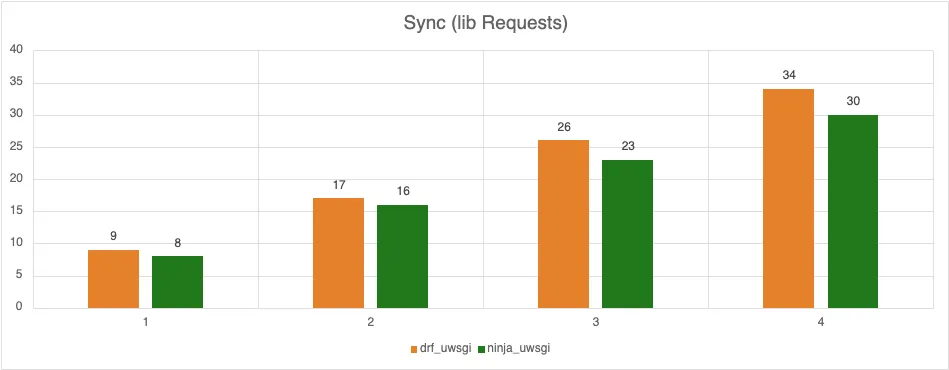
👉 Result: Unsurprisingly, Django Ninja takes the lead thanks to its lightweight nature, but the gap is less abysmal than when changing application servers. DRF remains quite capable, but Ninja’s Pydantic validation gives it a boost.
2. API Calls with Aiohttp Lib (Asynchronous Client)
Comparison: DRF-uwsgi Vs Ninja-uwsgi Vs DRF-uvicorn Vs Ninja-uvicorn
Here, we bombard the server with concurrent requests.

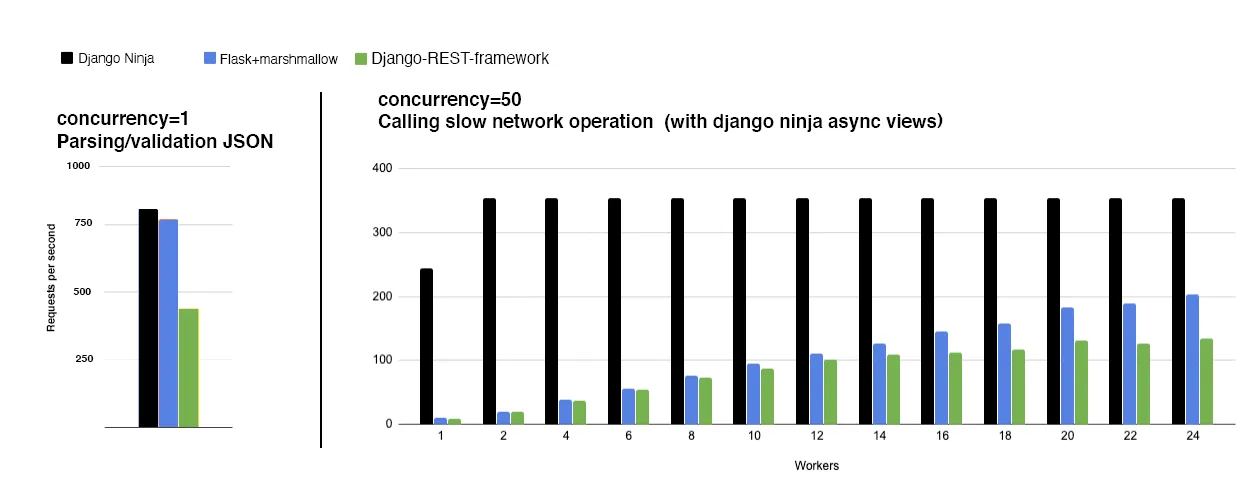
👉 Result: This is where it gets interesting. One might think Async wins every time. However, on simple operations or CPU-bound tasks (like heavy JSON serialization), Django (in Sync uWSGI mode) holds up incredibly well, sometimes even surpassing poorly configured Async versions.
Thread management by uWSGI is extremely mature and performant for standard Python code.
3. JSON Input Validation
Comparison: DRF Serializer vs Pydantic Schema
This is often the API bottleneck: validating what the user sends.
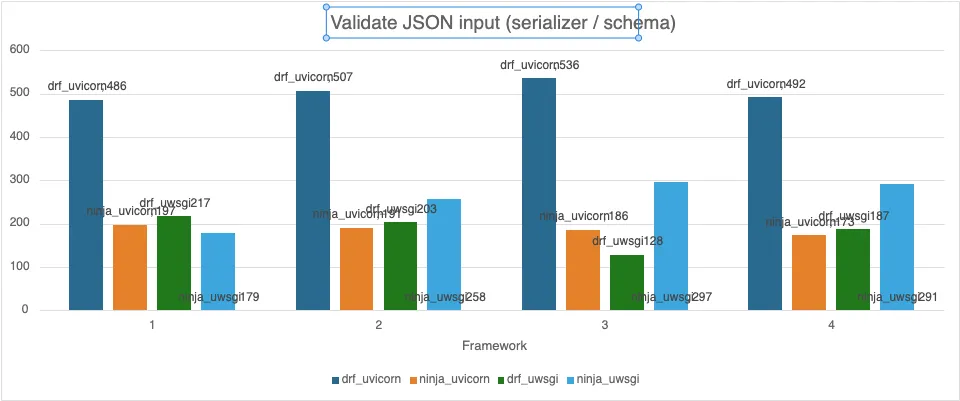
👉 Result: Pydantic (and thus Ninja) crushes DRF. 🚀 There’s no contest here. Pydantic is written partly in Rust (in v2) and optimized to the extreme. DRF Serializers are very flexible and powerful, but much slower in pure execution.
If your API does a lot of complex data validation, Ninja will save you precious time, regardless of the server (uWSGI or Uvicorn).
🏆 The Verdict: Django is the Winner 🎉
My conclusion might be counter-intuitive, but here is my analysis:
It’s not so much “Ninja vs DRF” or “Async vs Sync”. The big winner is the Django ecosystem.
- If you need raw validation performance: Ninja (Pydantic) is unbeatable.
- If you have an existing app: Switching to Ninja can help, but optimizing your WSGI server (switching to uWSGI with the right thread/process settings) is often the most cost-effective optimization (ROI).
- Async is not magic: As I explained in another article, async only becomes indispensable for very specific I/O (WebSockets, SSE, slow outgoing HTTP requests). For classic CRUD, a well-tuned synchronous Django is a beast.
In Summary
Official benchmarks don’t lie, but they tell a specific story (Ninja’s “happy path”). In real-world conditions, on equal ground (Sync vs Sync), Ninja remains faster thanks to Pydantic, but DRF is not as “has-been” as people say.
My advice? Test it yourself with your own use cases!
Have you observed the same results in prod? Let me know on Twitter or LinkedIn!